Showing posts with label iPads. Show all posts
Tuesday, August 1, 2017
TRUDACOT POSTER
As a staff we had the privilege to work with Dr. Scott McLeod this summer. Dr. McLeod led us through the Trudacot Model one day in June and then we were able to see him at the St. Vrain Tech Camp a week later.
The TRUDACOT Model is all I believe about Technology - wrapped into one checklist. At first the terminology and work can be unwieldy. It can be uncomfortable because we all see ourselves in that top level surface Tech "integration". TRUDACOT is all about making the Tech invisible and student work meaningful.
Our staff was inspired by this model and we believe it's the next step for our building. I put together a poster for us to refer to as we go through the year.
Monday, November 21, 2016
3 Best Apps for Classroom Creation in less than 20 Minutes
Felt Board 2.99 App Store, Software Smoothie
Felt Board is a staple with our Primary kids throughout the building! This app gets used in any subject and can be used to communicate all learning. FB is one of the first apps I teach in Kindergarten and we go strong through early 2nd.
One of the most fun Library features about Felt Board is the Fairy Tale character selection and general story characters. After learning Library iPad norms we may start with reading a story together and using Felt Board to share Main Character. Another day we may show setting AND characters. We can use this app to show Plot as well. Felt Board works well with partners. One of my favorite activities was when groups of three Kinders "pre-read" a book then showed the Main and Supporting Characters.
*My Principal happened through the Library through this lesson and was AMAZED by all the standards we hit. Our District just moved to Evidence Based Grading and I think she was most thrilled by all of the EVIDENCE we collected in minutes.
I LOVE, LOVE pulling out FB with older 2nd graders and 3rd graders when we introduce/ use graphs, charts and systems. The kids are so familiar with FB that we can focus on the new concepts. Felt Board provides a strong selection of Chart and Graph Templates.
Book Creator App Store, FREE
Like Felt Board, Book Creator is one of the very first apps we teach. The best thing about this app is that the student drives the car. Think of it literally as on online book - your students fill the pages with their learning!
This book was used in Science - but this Teacher can use Stevie's title to show Evidence. Stevie clearly knows that "certain groups of letters have their own sounds".
This student is using one of the most popular and versatile features of Book Creator - Comic Book Pages. Here BC was used for sequencing but the Comic Book pages open the interest level and application to K-5 and above.
The latest version of Book Creator can be read to the student by Siri which is a cool change, We love having the kids narrate their own work and work on presentation skills.
ChatterPix, App Store, FREE by Duck Duck Moose
Kids LOVE ChatterPix so that means I LOVE CHatterPix!! It is so much fun to pull out and I love that kids can share learning in less than 30 minutes. Mostly I have kids collaborate and ideate before we pull out devices.
Users can take pictures, screen shots, draw, use the templates or add any images to animate. I have seen pictures of work, characters, famous people, and concepts animated.
One of my FAVORITE pieces of work ever was when a student used Chatter Pix and Unicorn from Unicorn Thinks He's Pretty Great to explain the impact of Bullying to his classmates.
Please share how you use these apps and let me know which ones I am missing!! Happy Apping!
Monday, February 3, 2014
Unite for Literacy - Primary Grades Alternative to Overdrive
I AM IN LOOOOVVVVVEEEE with our District's online Library. How can I count the ways? The selection, the ease, the updated titles, I seriously could go on and on.....
This afternoon I hosted 21 Kinders in the Library with the intention of walking them through their first ever Overdrive check out. These Kinders have their own iPads! These Kinders are savvy users of technology! These Kinders are readers - a better fit there never has been.
About 35 minutes before they arrived their teacher mentioned offhand that they all use the generic Kinder login - fghjkl vs a personalized username and password. No problem! The above qualifications mean they will adjust.
About 17 minutes before they came I realized I did not have 21 individual Amazon emails and passwords. No problem, they could all use my generic one for the library.
About 3 minutes after they arrived I realized I was insane. As I crawled around on the rug from kid to kid checking logins and adding 00s their teamwork and enthusiasm impressed me. As I told them I would be in Wednesday morning to split into Centers and load books my tunnel vision overwhelmed me. What was I thinking? As many successful downloads as we have had this month in our small library, these are Kinders!! Savvy and intuitive, yes; 10 years old, no.
OK, this is where www.uniteforliteracy.com enters. NO PASSWORDS!!! NO BOOKS ON HOLD!! ENGAGING PHOTOS!!
This FREE website is filled with over 100 Titles my Kinders can access in one click and be reading instantly. The text is accessible and designed for emerging readers. Just exactly what we need, and a perfect springboard for my adventure in Kinder Overdrive.
Each book can be narrated in a Global choice of language - amazing and just right for our ELA kids and families.
This reminds me of RAZ-Kids minus the subscription fee and testing. Like I said, a one click reading resource.
This afternoon I hosted 21 Kinders in the Library with the intention of walking them through their first ever Overdrive check out. These Kinders have their own iPads! These Kinders are savvy users of technology! These Kinders are readers - a better fit there never has been.
About 35 minutes before they arrived their teacher mentioned offhand that they all use the generic Kinder login - fghjkl vs a personalized username and password. No problem! The above qualifications mean they will adjust.
About 17 minutes before they came I realized I did not have 21 individual Amazon emails and passwords. No problem, they could all use my generic one for the library.
About 3 minutes after they arrived I realized I was insane. As I crawled around on the rug from kid to kid checking logins and adding 00s their teamwork and enthusiasm impressed me. As I told them I would be in Wednesday morning to split into Centers and load books my tunnel vision overwhelmed me. What was I thinking? As many successful downloads as we have had this month in our small library, these are Kinders!! Savvy and intuitive, yes; 10 years old, no.
OK, this is where www.uniteforliteracy.com enters. NO PASSWORDS!!! NO BOOKS ON HOLD!! ENGAGING PHOTOS!!
This FREE website is filled with over 100 Titles my Kinders can access in one click and be reading instantly. The text is accessible and designed for emerging readers. Just exactly what we need, and a perfect springboard for my adventure in Kinder Overdrive.
Each book can be narrated in a Global choice of language - amazing and just right for our ELA kids and families.
This reminds me of RAZ-Kids minus the subscription fee and testing. Like I said, a one click reading resource.
Monday, January 27, 2014
THANK YOU, OtterBox
Right before Winter Break, OtterCares, a division of OtterBox visted our school. We were thrilled to have the possibility of a partnership with this local Tech firm (www.otterbox.com). Little did we know that not only was this the beginning of such a partnership but a trip with purpose! OtterCares gifted us that day with 25 iPads for our school AND OtterBox cases for each iPad in our school. Can you say Holiday Miracle? We can not express how grateful we are as a staff to grow our Technology reach.
Thankfully, kids are far better at that so we left it to the professionals. This morning I had the chance to visit OtterCares with my Principal and deliver some Thank Yous right from the mouths of students.
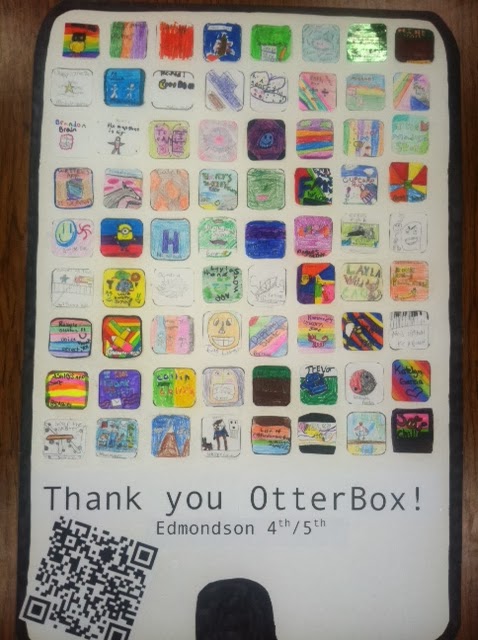
Our 4/5 Classes knocked it out of the park with this Thank You!! This giant 2' x 3' iPad is filled with Gratitude Apps designed by our students. Once you scan the QR code you get a chance to see their Thank You Dance.
I could not help myself and had to laminate these rules our Kinders created for their new iPads. The sincerity behind #3 is real!
1B created this iMovie slideshow highlighting their Thank You Letters. My favorite pictures show the friends sharing letters.
My upside down 3A Thank You was created from www.tagxedo.com after the kids brainstormed how they could thank OtterBox.
Why NOT finish upside down? 1A created this interactive writing and we attached the QR Code to show the read aloud portion.
Thankfully, kids are far better at that so we left it to the professionals. This morning I had the chance to visit OtterCares with my Principal and deliver some Thank Yous right from the mouths of students.
Our 4/5 Classes knocked it out of the park with this Thank You!! This giant 2' x 3' iPad is filled with Gratitude Apps designed by our students. Once you scan the QR code you get a chance to see their Thank You Dance.
I could not help myself and had to laminate these rules our Kinders created for their new iPads. The sincerity behind #3 is real!
1B created this iMovie slideshow highlighting their Thank You Letters. My favorite pictures show the friends sharing letters.
Why NOT finish upside down? 1A created this interactive writing and we attached the QR Code to show the read aloud portion.
Subscribe to:
Posts (Atom)